Square Monogram Framer: A Simple Tool for Professional and Personal Branding
In today’s fast-paced digital world, branding is more than just a logo or a tagline—it’s about creating a consistent and recognizable identity across all platforms. Whether you're a small business owner, a creative professional, or someone looking to personalize your space, the Square Monogram Framer offers a straightforward solution for crafting custom monograms that fit seamlessly into your workflow.
What Is Square Monogram Framer?
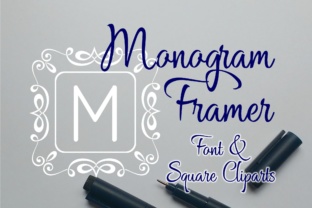
The Square Monogram Framer is a tool designed to help users create square-shaped monograms with ease. It allows you to input a single letter or number and place it within a pre-designed frame. The process is simple: choose a frame from 0-9, type your desired letter, and watch as it automatically centers itself within the selected design. This tool is ideal for those who want to add a personal touch to their work, whether it's for marketing materials, social media profiles, or home decor.
Unlike traditional methods that require graphic design software or manual placement, the Square Monogram Framer streamlines the process, making it accessible to users of all skill levels. It’s particularly useful for individuals who need quick, high-quality results without the complexity of advanced design tools.
Integrating Square Monogram Framer Into Your Workflow
The Square Monogram Framer can be integrated into various stages of a project, from initial planning to final execution. For example, if you’re designing a marketing campaign, you might use it during the branding phase to create a consistent visual element that appears across all materials. Similarly, if you're working on a personal project like a custom gift or a DIY home decor item, the tool can help you achieve a polished look in minutes.
One of the key benefits of the Square Monogram Framer is its compatibility with other design tools. You can export the finished monogram and use it in programs like Adobe Photoshop, Canva, or even Microsoft PowerPoint. This makes it a versatile addition to any creative or professional toolkit.
Use Cases for Square Monogram Framer
- Business Branding: Use the Square Monogram Framer to create a unique logo or identifier for your brand. This can be used on business cards, website headers, or social media avatars.
- Personal Projects: Customize items like mugs, t-shirts, or photo frames with your initials or a special number. The tool ensures your text is centered and aligned perfectly.
- Event Planning: Create monograms for event invitations, banners, or signage. The square format is ideal for maintaining a clean and professional appearance.
- Educational Materials: Teachers and educators can use the Square Monogram Framer to personalize worksheets, certificates, or classroom decorations.
How to Use Square Monogram Framer Effectively
Using the Square Monogram Framer is straightforward, but there are a few tips to ensure the best results. First, take time to choose the right frame. Each number (0-9) represents a different style, so consider the aesthetic you want to achieve. For a minimalist look, opt for a simple frame, while a more intricate design may suit a creative or artistic project.
Next, select a font that complements your design. While the tool allows you to use any font you have installed, it’s important to choose one that’s readable and visually appealing. Avoid overly decorative fonts unless they align with your overall design theme.
Finally, pay attention to the placement of your letter. The Square Monogram Framer automatically centers the text, but you can adjust the size or position if needed. This level of control ensures that your monogram looks professional and well-crafted.
Combining Square Monogram Framer With Other Tools
The Square Monogram Framer works best when paired with other design and productivity tools. For instance, if you're using Canva for graphic design, you can generate a monogram with the Square Monogram Framer and then import it into your Canva project. This approach saves time and maintains consistency across your designs.
For users who rely on Adobe Creative Cloud, the Square Monogram Framer can be a quick way to generate assets that can be further edited in Photoshop or Illustrator. This integration allows for greater flexibility and precision, especially for those who need to make minor adjustments to their monograms.
Additionally, the Square Monogram Framer can be used alongside project management tools like Trello or Notion. If you're organizing a branding project, you can create a monogram and reference it in your task list, ensuring that all team members are aligned on the visual direction.
Best Practices for Long-Term Use
To get the most out of the Square Monogram Framer, it’s important to establish a routine that supports consistent use. One way to do this is by saving your favorite frames and fonts for future projects. This reduces the time spent on setup and allows you to focus on the creative aspects of your work.
Another best practice is to maintain a library of monograms for different purposes. For example, you might create a set of monograms for business use and another for personal projects. This organization helps streamline your workflow and ensures that you always have the right design at your fingertips.
Lastly, stay updated on new features or improvements to the Square Monogram Framer. As technology evolves, tools like this often receive updates that enhance usability and expand functionality. By staying informed, you can continue to leverage the tool effectively in your daily tasks.
Conclusion
The Square Monogram Framer is more than just a simple design tool—it’s a practical solution for anyone looking to add a personalized touch to their work or personal projects. Its ease of use, compatibility with other tools, and ability to integrate into various workflows make it a valuable asset for professionals and hobbyists alike.
Whether you're building a brand, creating custom gifts, or simply looking for a way to express your individuality, the Square Monogram Framer offers a straightforward and efficient way to achieve your goals. With a little planning and creativity, you can unlock the full potential of this tool and elevate your design process.